 StoreySG
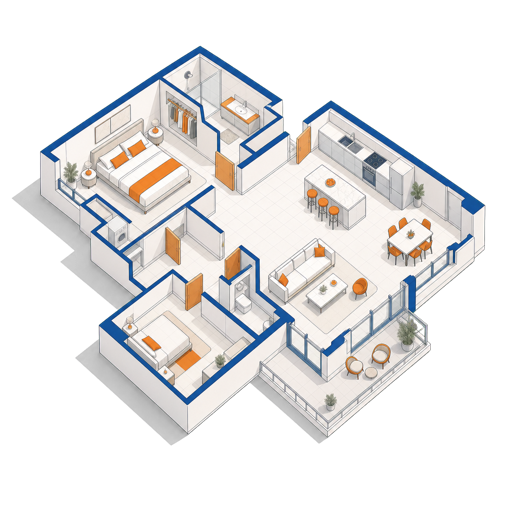
Precise CAD Floor Plans: How StoreySG Gives You Millimetre-Accurate DXF Output
A mood board looks beautiful but cannot be measured. A CAD floor plan can — and when your contractor quotes and builds from a precisely dimensioned plan, what gets built matches what you designed. StoreySG stores every wall and opening in millimetres and exports your plan as a DXF file that opens in AutoCAD, LibreCAD, and QCAD.
What Is CAD, and Why Does DXF Matter?
CAD stands for Computer-Aided Design — software that draws geometry with exact coordinates rather than approximate brushstrokes. Instead of a freehand sketch, every wall has a start point, an end point, and a length stored as numbers. That means any measurement you read off the drawing is the same number that goes into a contractor's quote or a carpenter's cut-list.
DXF (Drawing Exchange Format) is the open file format that lets CAD drawings move between different programs. AutoCAD — the industry-standard software used by most architecture and drafting professionals — exports and imports DXF. So do the free alternatives LibreCAD and QCAD. When StoreySG exports your floor plan as a DXF file, your designer, contractor or carpenter can open it in whatever CAD tool they already use, without buying expensive software.
The DXF variant StoreySG exports is R12 — an older, widely compatible revision of the format. Almost every CAD program released in the last 25 years can read R12, which means you will rarely hit a compatibility problem passing the file to a professional.
StoreySG exports a millimetre-accurate 2D floor plan drawing. It is not a DWG file, not a stamped PE-certified construction drawing set, and does not include MEP (mechanical, electrical, plumbing) engineering. For structural changes or official permit submissions, you will still need a licensed contractor and, where required, a Professional Engineer.
Why a Mood Board Cannot Replace a Measured Plan
Most people start a renovation with images — Pinterest boards, magazine cuttings, a 3D render from a showroom. Visual references are useful for agreeing on a style, but they carry no geometry. You cannot ask a mood board "will a 1800 mm sofa fit along that wall with 600 mm clearance on each side?" and get a reliable answer.
A measured CAD floor plan answers that question directly. Common decisions that become easy once you have one:
- Furniture layout: check that a king-sized bed fits in the master bedroom with comfortable circulation space on both sides before any purchase.
- Carpentry sizing: send exact wall lengths and ceiling heights to a carpenter so joinery is made-to-measure, not cut down on site.
- Contractor quotes: a dimensioned plan means all tenderers are pricing the same scope, reducing surprise variation orders later.
- Tile and material quantities: calculate floor and wall areas precisely, minimising over-ordering and waste.
- Lighting and power-point placement: plan the exact position of switches, sockets and lights relative to furniture so nothing ends up behind a wardrobe.
How StoreySG Stores and Maintains Precision
When you upload your existing HDB or condo floor plan (as a PDF or image), StoreySG lets you trace your walls against it at true scale — you confirm the key dimensions so the model matches your actual unit, not a generic template. Every wall segment, door opening and window reveal is stored internally as millimetre coordinates.
Because the geometry lives in one source of truth, the 2D plan and the 3D model stay in sync automatically. If you move a wall in 2D, the 3D view updates instantly — and if you export DXF after that change, the exported file reflects the new position. There is no manual re-drafting step where dimensions can drift.
You can also use StoreySG's natural-language editing to describe changes ("widen the kitchen opening by 200 mm", "shift the wardrobe to the opposite wall") and the underlying coordinates update accordingly, keeping the plan measurable throughout the design process.
Before exporting, do a quick sanity check: click on a wall you know the length of from your HDB or condo floor plan and confirm the dimension shown in StoreySG matches. This is your ground-truth check that the model was traced at the correct scale.
What the DXF Export Contains
The exported DXF file includes the key elements a drafter or contractor needs to work with your plan:
- Wall lines drawn at their actual thickness and length in millimetres.
- Door and window openings shown as breaks in walls at the correct width.
- Dimension annotations labelling key lengths so the file is readable without CAD expertise.
The export is a 2D floor plan — a top-down view of your space, which is the standard format contractors and carpenters work from. It is not a 3D model file (for 3D, use the GLB, OBJ, STL or USDZ exports).
How the DXF Fits Into a Real Renovation Workflow
In a typical Singapore renovation, here is where the DXF export is most useful:
| Renovation stage | How the DXF helps | Who uses it |
|---|---|---|
| Getting quotes | All contractors tender from the same dimensioned plan — apples-to-apples comparison | You, renovation contractors |
| Carpentry design | Exact wall lengths and heights go directly to the carpenter — no re-measuring on site | Carpenter / joinery workshop |
| Working with an interior designer | Hand over a scaled digital plan instead of manual sketches — saves the ID's drafting time | Interior designer |
| Electrical and aircon layout | Overlay planned furniture to position power points and fan coil units correctly | Electrician, aircon installer |
| Pre-purchase furniture check | Import DXF into LibreCAD/QCAD and drop in furniture blocks to verify fit before buying | You |
For a broader picture of the renovation process, interior designer vs contractor covers how professionals use plans in practice. If you are working on an HDB unit, HDB flat types and floor plans explains how to source your original plan and understand its annotations.
DXF vs DWG: What Is the Difference?
You may hear contractors or designers ask for a "DWG file" — DWG is AutoCAD's native binary format, and it is slightly more feature-rich than DXF. In practice, for a floor plan containing walls, openings and dimensions, DXF and DWG carry essentially the same information. Any version of AutoCAD can open a DXF file, and free tools like LibreCAD can convert DXF to DWG if your contractor specifically needs that format.
StoreySG exports DXF, not DWG. For straightforward floor plan handoffs, this is not a problem in practice.
Opening and Verifying the DXF File
If you do not have AutoCAD, two free options work well:
- LibreCAD — free, open-source, runs on Windows/Mac/Linux. Good for viewing, measuring and basic edits.
- QCAD Community Edition — also free and cross-platform, with a clean interface suited to non-professionals.
After opening the file, use the measurement tool to check a couple of known dimensions against your actual flat. If they match, your model is correctly scaled. If something looks off, go back into StoreySG and re-confirm the wall lengths against your original floor plan or a physical measurement.
The DXF reflects the dimensions you entered. Measure on site and verify — walls in older buildings sometimes deviate from the original developer plan due to plastering, tiling, or earlier renovations. Always get a physical check before finalising carpentry or tiling orders.
Limitations to Keep in Mind
Being honest about scope helps you use the tool correctly:
- Not a construction drawing set: a DXF floor plan is a layout and dimension reference. It does not replace a full set of architectural, structural or MEP drawings required for a major permit submission.
- Not PE-stamped or certified: for works that require a Professional Engineer's stamp (structural changes, etc.), you need a licensed PE to produce and sign those drawings separately.
- Accuracy is limited to your input: StoreySG's geometry is only as accurate as the dimensions you confirm when tracing. "Verify on site" is always good advice before cutting anything.
For a comparison of StoreySG's full capability set against other design tools, see why StoreySG is different.
Getting Started
To produce your first DXF export in StoreySG:
- Upload your HDB or condo floor plan (PDF or image) as the trace reference.
- Trace your walls, confirming at least two or three known dimensions (e.g. room length and width from your developer plan or a physical tape measure).
- Add door and window openings at their correct widths.
- Use the export panel to download the DXF file.
- Open in LibreCAD or QCAD and check a reference dimension before sharing with contractors.
The same model that produces your DXF also powers the live 3D view and the furniture BOM export — so a single accurate model serves your entire renovation workflow, from early-stage layout planning through to contractor briefing. If you want to explore the AI-assisted 3D side of the same workflow, AI rendering without a gaming PC explains how the 3D view works on ordinary hardware.
Design it in StoreySG
Upload your floor plan and design right in the browser — no install, no gaming PC. Edit by natural language, keep 2D and 3D in sync at true millimetre scale, and export a CAD-ready DXF, render-ready 3D, or a furniture list.
Try the editor freeFrequently asked questions
What is a DXF file and can my contractor open it?
DXF (Drawing Exchange Format) is an open CAD file format supported by AutoCAD, LibreCAD, QCAD and most professional drafting software. StoreySG exports DXF R12, one of the most widely compatible versions, so almost any CAD program your contractor uses can open it.
Is the DXF export the same as a stamped construction drawing?
No. StoreySG's DXF is a millimetre-accurate 2D floor plan useful for layout, quoting and carpentry — it is not a PE-stamped or certified construction-drawing set. For structural changes or official permit submissions you still need a licensed contractor and, where required, a Professional Engineer.
How accurate are the dimensions in the DXF?
The accuracy equals the precision of the dimensions you confirm when tracing your floor plan in StoreySG. Always verify critical measurements on site before finalising carpentry or tiling orders, as older buildings can deviate from developer plans.
Can I get a DWG file instead of DXF?
StoreySG exports DXF, not DWG. For most floor plan handoffs this makes no practical difference — AutoCAD and other tools open DXF directly. If a contractor specifically needs DWG, free tools like LibreCAD can convert DXF to DWG.
What free software can I use to view the DXF file?
LibreCAD and QCAD Community Edition are both free, cross-platform CAD viewers that open DXF files without requiring an AutoCAD licence.
Does changing the 3D model update the DXF export?
Yes. StoreySG's 2D plan and 3D model share the same underlying geometry. Any wall or opening you move in the 2D view — whether by direct edit or natural-language command — is reflected in the next DXF export, so the two never go out of sync.